

DISTRIBUTORS & ENGINEERING
AI Automation for Distributors & Engineering
ADSM helps Singapore distributors and engineering firms automate RFQs, quotation drafts, order entry and follow-up, with staff review and integrations.
ADSM has built conventional business systems for distributor and engineering companies, giving our team practical understanding of the work between an enquiry and an order. For wholesalers, industrial suppliers, equipment distributors and B2B engineering teams, that process often spans several people and systems. AI can assist selected steps, but the starting point remains one repeated workflow with clear checks before customer or operational commitments.
THE DAILY BOTTLENECK
The enquiry is only the start of the work.
A product request can arrive in an email, spreadsheet or WhatsApp message. Someone still needs to clarify it, check reference data, prepare a quotation and pass the right details to operations.
01
Different descriptions
Customers use abbreviations, old part numbers or application descriptions that do not match your catalogue. A similar name is not enough to confirm the correct item.
02
Repeated data entry
Staff retype quantities, customer details and delivery information between RFQs, quotations and purchase orders, creating opportunities for inconsistencies.
03
Knowledge held by a few staff
Experienced employees know which questions to ask and which exceptions matter. Capture those checks in a shared workflow while keeping their judgement available.
FROM ENQUIRY TO ORDER
Keep the source, the checks and the next action together.
ADSM combines document extraction, business rules and custom software around your process. The following example illustrates how a workflow could be scoped; it is not a customer case study.
01
Understand the request before matching products
A buyer asks for a replacement valve but omits the pressure rating and connection type. The workflow can extract the known details, suggest catalogue candidates and list the questions still needing an answer. It should not decide technical equivalence from a similar product name. Explore the RFQ and quotation workflow.
02
Prepare a quotation your salesperson can check
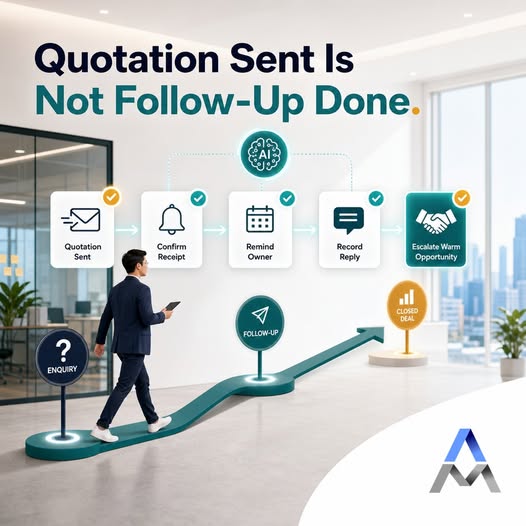
Bring the requested items, suggested products, quantities and authorised pricing into a draft. Flag pack-size differences, outdated price references and discount exceptions. Staff review the specification, availability, price validity and commercial terms before sending. AI assists preparation; it does not replace technical or commercial approval.
03
Carry the approved details into operations
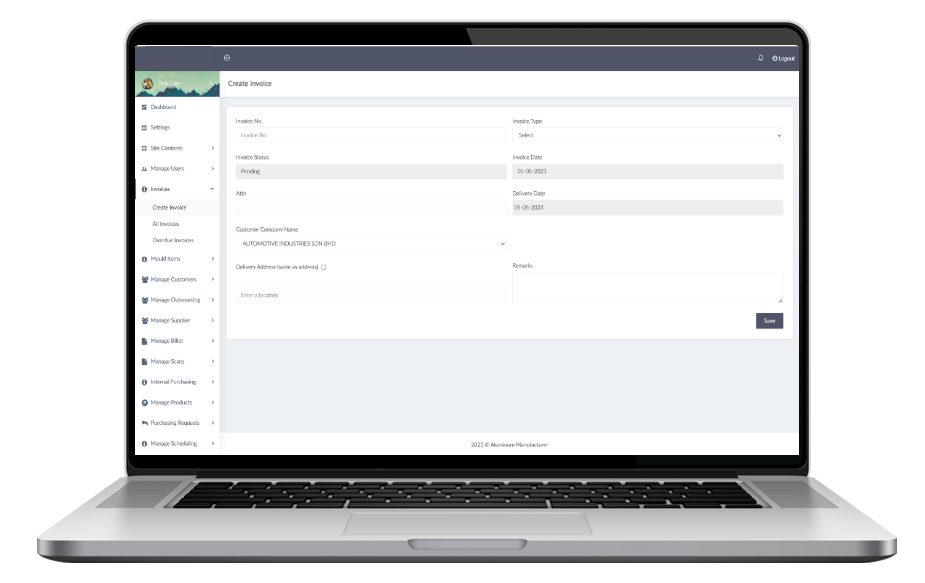
When a purchase order arrives, compare it with the approved quotation: item, revision, quantity, unit, price and delivery details. Prepare an order draft and flag differences for review. Connect to your ERP or inventory workflow where supported. The existing ADSM operations interface shown here supports invoice entry; AI connections are scoped and tested separately.
WORKFLOWS TO CONSIDER
Automate preparation without losing control.
Choose the parts that fit your product range and operating model. These are scoping options, not a fixed package in which every integration is included.
01
RFQs and product matching
Extract item descriptions and specifications from email and attachments. Suggest catalogue matches, with missing fields and alternative candidates visible to the reviewer.
02
Quotation preparation
Assemble a draft using approved products, customer terms and pricing sources. Keep discount, substitution and unusual-quantity decisions with authorised staff.
03
Purchase-order entry
Compare a customer PO against the accepted quotation. Flag changed delivery addresses, units or prices and check for duplicate orders before creating a record.
04
Documents and technical knowledge
Search approved datasheets, manuals and project documents with source references. Check version and applicability; the assistant should not certify engineering suitability.
05
Sales enquiry qualification
Gather the requirement, application, quantity and timing before assigning an enquiry. Optional WhatsApp or voice workflows require separate scoping and appropriate contact permissions.
06
Follow-up and CRM updates
Record the quotation owner, customer response and next action. Prepare reminders or task updates without assuming that silence means acceptance or an order is confirmed.
SYSTEMS AND GUARDRAILS
Use the right source for each decision.
Your catalogue, ERP, inventory records and customer terms may not agree automatically. Decide which system owns each field before adding AI.
For a product, keep the approved SKU, specification and unit of measure together. A box of ten is not one piece. For pricing, check the effective date and customer terms. For stock, use current availability from the authorised system rather than an old document or the AI model’s memory.
Use supported APIs or reviewed imports where practical. Restrict permissions, log changes and check duplicate actions on retries. Start with drafts when a mistaken update could affect fulfilment, pricing or a customer commitment.
Retain a human route for unclear specifications, substitute products, engineering decisions and disputed orders. Ordinary validation rules are often enough for structured fields; use AI where interpreting variable language or documents adds value.
IMPLEMENTATION
Prove one workflow before expanding.
A useful pilot demonstrates reliable handover, not just fast document reading.
01
Choose one bottleneck
Start with one inbox, document type or product family. Define what staff currently do and which decisions must stay with them.
02
Prepare the reference data
Review catalogue fields, units, customer records and current pricing. Identify the authoritative source and who can change it.
03
Test normal and difficult cases
Use reviewed examples with missing specifications, pack-size differences and amended orders. Check suggested matches and exceptions against staff decisions.
04
Connect and measure
Pilot reviewed outputs before allowing live updates. Track handling time, correction rates, unresolved items and auditability, then expand only where the results justify it.
FAQ
Questions from sales and operations teams.
What to prepare, what can connect and where staff remain involved.
Do we need to replace our ERP or inventory system?
Not necessarily. We first review the APIs, supported imports and exports, permissions and data quality. An AI workflow can prepare reviewed records for your current system. Replacement is only worth considering if the existing system cannot support the required process.
Can AI match a customer description to our product code?
It can suggest candidates from an approved catalogue, using available descriptions and specifications. It must flag missing details and ambiguous matches. Technical equivalence, compatibility and substitutions need a qualified reviewer, particularly when safety or contractual requirements are involved.
Can this work with PDF, Excel and emailed purchase orders?
These can be included after testing representative samples. Scans, mixed units, complex tables and incomplete orders may need extra validation or manual entry. Keep the original file and source references available so staff can check extracted values.
Who approves prices, substitutions and orders?
Your authorised staff should approve commercial and technical decisions. The initial workflow can draft quotations and order records, but it should not invent prices, change agreed terms, select unapproved substitutes or release an order without the required checks.
What information should we prepare for a pilot?
Start with anonymised RFQs or purchase orders, a relevant catalogue extract, unit definitions, approved pricing rules and examples of difficult cases. Limit access to what the pilot needs. Agree the data owner, review process and retention arrangements before connecting live systems.
How much will it cost, and what should we automate first?
Cost depends on the workflow, document variation, catalogue quality, integrations and approval controls. Choose one repeated bottleneck, such as preparing quotation drafts from a single inbox. ADSM can scope a small proof of concept before proposing a larger rollout; ongoing usage and support should be itemised.
RELATED SERVICES
Connect the parts your team needs.
Explore the AI Solutions hub for the wider service range. Add CRM follow-up, optional AI WhatsApp or a scoped voice-agent workflow when those channels support the process.
DISCUSS YOUR WORKFLOW
Show us where enquiries or orders get stuck.
Share a non-sensitive sample RFQ, purchase order or current process. We can discuss the checks, integrations and a practical first scope for your team.