

RFQ & QUOTATION AUTOMATION
AI RFQ & Quotation Automation Singapore
Quotation automation for Singapore SMEs: process email RFQs, suggest product matches and prepare drafts with pricing checks and staff approval.
ADSM is currently developing an AI-assisted quotation and RFQ workflow for an SME. Our earlier conventional system work for distributor and engineering companies provides practical understanding of product data, approvals and operational handovers. Each implementation is still designed around the customer’s catalogue, pricing rules and existing quotation system, with final review kept with authorised staff.
BUSINESS PROBLEM
Preparing a quotation involves more than copying a product name.
A buyer may use an old description, omit a specification or request an unusual quantity. Staff need to interpret the RFQ, find the correct SKU, check applicable pricing and resolve exceptions before quoting.
01
Descriptions do not match
Customer wording, abbreviations and supplier descriptions differ from the internal SKU catalogue.
02
Important details are missing
Size, material, unit, model or specification may be incomplete, with several plausible products available.
03
Pricing needs judgement
Historical prices, special discounts and unusual quantities cannot simply be reused without checking current rules.
SOLUTION OVERVIEW
From incoming RFQ to a reviewed quotation draft.
Keep the original request, proposed matches and unresolved questions together as the RFQ moves towards a quotation draft.
- Customer email. Retain the message and customer reference alongside the attached request.
- PDF or Excel RFQ. Read the supported attachment and keep a reference to the source file.
- Extract products, quantities and specifications. Capture the line items and flag missing units or technical details.
- Match against the SKU or product database. Suggest candidate products and show ambiguous matches for review.
- Check customer and historical pricing. Consult authorised sources and check current validity, customer terms and discount rules.
- Confidence and exception check. Hold uncertain matches, unusual quantities and incomplete specifications for staff clarification.
- Draft quotation. Prepare a draft in the agreed format, keeping any unresolved issues visible.
- Salesperson review and approval. Check the products, quantities, prices and terms before releasing the quotation.
01
Read the request and suggest products
Extract the requested items, quantities and specifications. Compare descriptions with the product catalogue, showing possible matches and the evidence needed to distinguish them. Do not silently choose a substitute.
02
Check pricing and exceptions
Use the agreed source for current prices and customer terms. Flag stale historical prices, missing specifications, unusual quantities and discount exceptions. If the match is uncertain, ask for review or clarification.
03
Prepare the draft, then let staff approve
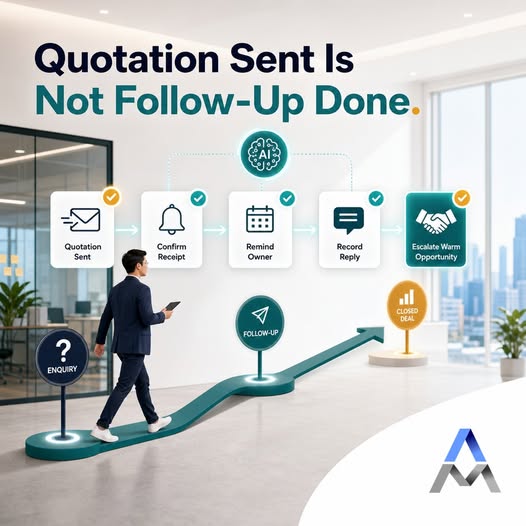
Put reviewed items into the agreed quotation format or system. The salesperson checks products, quantities, prices and terms before release. After sending, an owner and next action can keep follow-up visible.

SCOPE & USE CASES
What the workflow can include.
The final scope depends on your data, existing systems and the controls needed by your team.
01
Email RFQ intake
Collect the message and supported attachments together, preserving the customer request and file references.
02
Product and quantity extraction
Read line items from supported PDFs and spreadsheets. Flag unclear units, missing quantities and incomplete specifications.
03
SKU and product matching
Suggest candidate products from the approved catalogue. Surface ambiguous matches and avoid inventing product codes.
04
Customer pricing checks
Look up authorised pricing and customer rules where available. Historical quotations are context, not automatic approval for a current price.
05
Draft quotation preparation
Prepare a structured draft for the existing quotation workflow, with unresolved issues visible to the salesperson.
06
Connected follow-up
After approval and sending, record ownership and next actions in the agreed CRM or system. WhatsApp automation is an optional, separately scoped extension.
IMPLEMENTATION
Start with a focused pilot.
Agree the task, acceptance criteria and review responsibilities before expanding.
01
Review real RFQs
Use typical requests and difficult cases, plus the relevant catalogue and pricing rules. Share anonymised samples where possible.
02
Define matching and approval rules
Agree required specifications, acceptable match criteria, pricing sources and cases that must be reviewed.
03
Pilot the draft workflow
Compare proposed products and quotation drafts with staff-reviewed examples. Measure corrections and handling time, not just extraction speed.
04
Integrate and expand
Connect agreed email, CRM, ERP, inventory, product and quotation systems or Excel outputs. Add more cases after the pilot is reliable enough for the team.
FAQ
Questions before starting.
Practical considerations for scoping the first version.
Can the system fully automate every RFQ?
No. Some requests need clarification, technical judgement or commercial negotiation. The system should reduce preparation effort and clearly flag the cases that need a person.
What if several SKUs could match?
Show the candidates and missing information to the reviewer. The workflow should hold the item for clarification rather than guess which product the customer wants.
Can it use customer-specific or historical pricing?
It can consult authorised sources where an integration is available. Current pricing rules, validity and special discounts still need checking; an old quotation should not automatically determine a new price.
Can it read RFQs from email, PDF and Excel?
These formats can be included after sample testing. Complex layouts, scans and incomplete descriptions may need additional review or preprocessing.
Can we keep our current quotation or ERP system?
Often yes, depending on its interfaces. ADSM can assess API integration, supported imports or a reviewed Excel output before recommending a replacement.
Will a quotation be sent without staff approval?
The recommended starting workflow prepares a draft for salesperson review and approval. Any later automation of sending must be explicitly scoped, with clear rules and exception handling.
RELATED SERVICES
Connect the next part of the workflow.
Explore the AI Solutions hub for the wider service range. See how distributors and engineering companies can connect the RFQ stage to purchase-order checks, order entry and customer follow-up.
Document extraction and validation | ERP and product database integration | Custom quotation applications | Track quotation follow-up
DISCUSS YOUR WORKFLOW
Show us your RFQ workflow
Send us a non-sensitive example of the current process and the result your team needs. We can discuss suitability, scope and a practical next step.